
Youtube Sidebar Not Showing: Here Are 6 Ways To Fix It

Diving into the YouTube universe is just an everyday thing for lots of folks, me included. Whether you’re a YouTuber, musician, entertainer, or just someone who loves watching videos, YouTube’s a big deal. But, like all things techy, it can have some weird moments. Ever had that “YouTube sidebar not showing” thing? Super annoying, right? Been there, done that. But hey, I’ve dug around and found some easy fixes. So, whether YouTube’s your big shot to fame or just where you chill, it’s cool to know your way around. Ready to check out these solutions?
Why Is The YouTube Sidebar Not Showing?

Just to break it down, YouTube has two sidebars to make things easy. The left one’s got all the good stuff like Trending, Subscription, Library, and History. On the right? That’s where you get video suggestions.
Wait, where’d the YouTube sidebar go? Yep, I’ve asked that too. Trust me, it’s a head-scratcher a lot of us have faced. But the good news? We’ve got a bunch of tried-and-true fixes from folks who’ve been through it.
Some users say you just gotta wait a bit, like the sidebar’s on a coffee break or something. But if hanging tight doesn’t do the trick, no worries. I’ve got a list of hacks right here, from cleaning out YouTube junk to just logging in again. Let’s dive in and sort this out!
7 Methods to Troubleshoot the YouTube Sidebar Not Showing
Ever tried getting around YouTube without the sidebar? Feels a bit like wandering around a new city without Google Maps, right? Trust me, I’ve been there, all lost with the whole “YouTube sidebar not showing” drama. But hey, I’ve tried a bunch of stuff, and some of it actually works! So, I’ve listed out some handy fixes so you won’t miss out on the YouTube goodness.
1. Dive into Incognito Mode
Chrome’s incognito mode isn’t just for secret shopping sprees; it might just get your sidebar back. It’s like giving YouTube a fresh start without all the cookies and old stuff in the way.
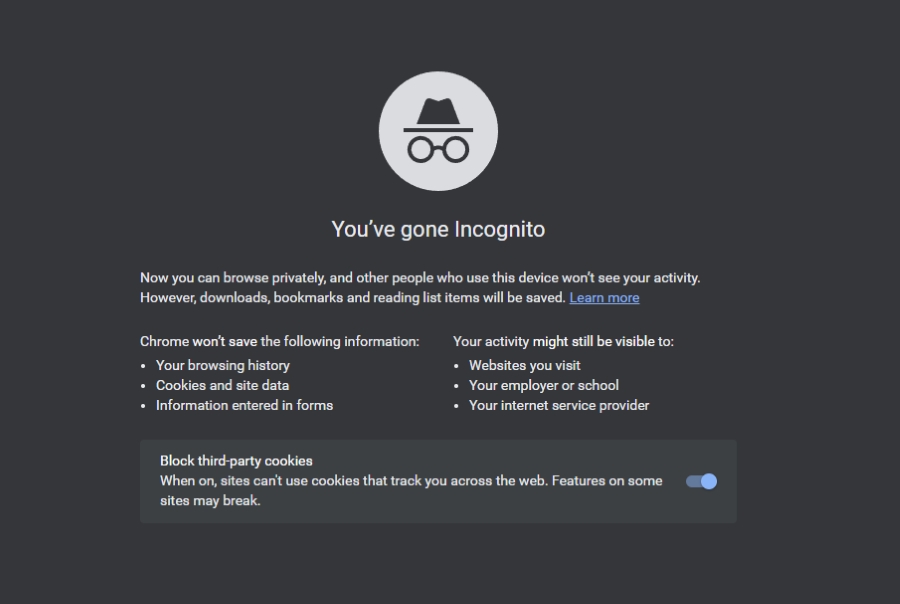
- Quick Tip: Wanna get started fast? Hit “ctrl” + “shift” + “n” and you’re there!
2. Clear YouTube’s Cache and Cookies
Sometimes old cookies and cache stuff up our YouTube vibes. Clearing out the old junk can sometimes set things straight.
- Head over to Chrome’s Settings.

- Hit “Privacy and security”, then hop over to “Site settings”.

- Keep scrolling until you see “Cookies and site data”.

- Dive in and hit “All cookies and site data”. Pop “YouTube” in the search bar and get rid of anything YouTube-related.

Then, cross your fingers and fire up YouTube. Hopefully, that pesky sidebar will be back to say hi. If not, no stress; I’ve got a few more ideas to try.
3. Re-Login to Your Account
You know what? Sometimes, the easiest things can do the trick. Just like turning your phone off and on (classic, right?), logging out and back into YouTube might just work.
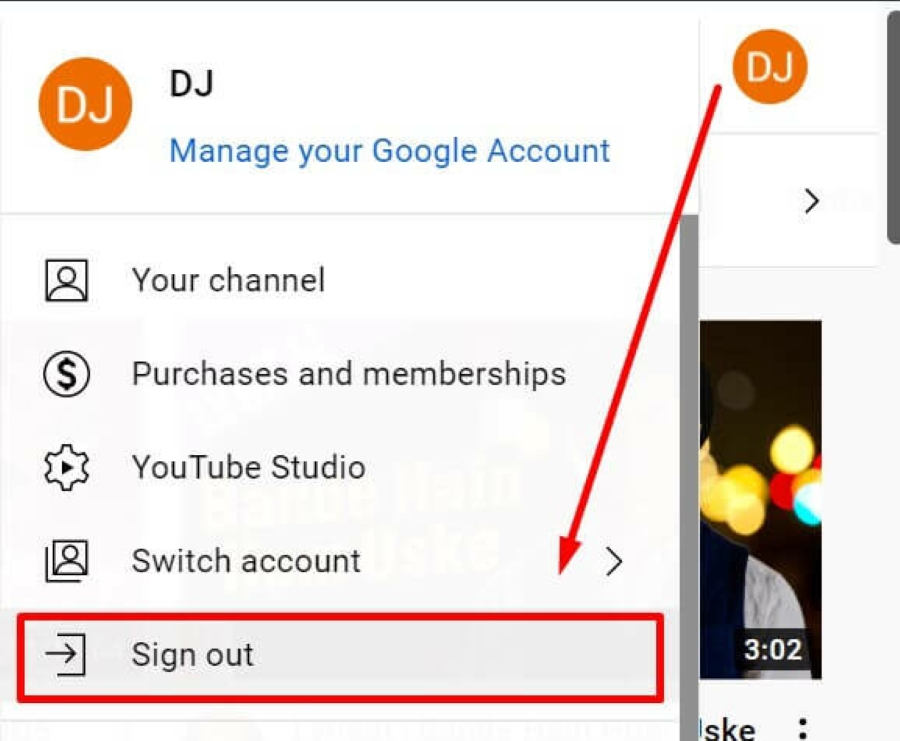
- Click on your profile pic up top.
- Hit ‘Sign out’ and then log back in. A lot of times, this quick refresh can bring back that sneaky sidebar.
Want to stay logged in? Dive deeper to uncover Why YouTube Keeps Signing Me Out and grab your fix!
4. Turn Off Those Chrome Extensions
Okay, Chrome extensions are cool and all, but sometimes they mess with sites like YouTube.

- Pop open Chrome settings.
- Head over to ‘Extensions’ and, just for now, turn ’em all off.
5. Check Out YouTube’s Menu & Zoom Levels

Open up YouTube and check out those three lines on the top left. Still not seeing the sidebar? Could be a zoom thing. Sometimes, Chrome goes a bit overboard and zooms in too much, making stuff like our sidebar disappear.
- Make sure Chrome’s zoom is chillin’ at the usual 100%. If it’s not, bring it back down.
6. Give Another Browser a Shot
If everything else isn’t doing it, maybe it’s time for a change. If the “YouTube sidebar not showing” thing is still bugging you:
- Fire up a different browser on your computer.
- Jump into YouTube and see if the sidebar’s back in action.
Alright, wrapping things up, this whole “YouTube sidebar not showing” thing is a pain that a bunch of us have run into. But chill, with a bit of patience and the right moves, we can totally tackle it.
Honestly, diving into all these fixes taught me one thing: sometimes the answer is right in front of you. Or sometimes, it’s super random. Either way, these tricks worked for me, and I’m betting they’ll help you out too. And hey, just remember that YouTube’s always changing, so some glitches are bound to happen. Keep Youtube Repeat in your favorites for all the YouTube fixes and tips. After all, making YouTube work smoothly is just a click away!

I am Eric Mason, the founder of TubeLoop.io and I have extensive experience with digital marketing and media. I have employed my expertise to launch a multitude of successful online businesses, ranging across a variety of industries. I also enjoy tackling startups, taking calculated risks and taking advantage of opportunities – I believe these attributes act as catalysts for success within any industry. I look forward to continuing my journey toward success with TubeLoop.io makes it possible for people to watch youtube videos over and over again, it is something I am passionate about and I’m excited to see what the future holds.
Related Posts

How to Loop a YouTube Video on iPhone or iPad?
![Do you get a play button for 1000 subscribers on Youtube? [Full Guide 2025]](https://tubeloop.io/wp-content/uploads/2024/02/do-you-get-a-play-button-for-1000-subscribers-on-youtube-1024x538.jpg)
Do you get a play button for 1000 subscribers on Youtube? [Full Guide 2025]
